User¡¯s Guide to FrogLingo
Language
Release 0.1
10/10/2004
1. Introduction.. 2
1.1 What is FrogLingo.. 2
1.2 Why FrogLingo. 2
1.3 Get yourself ready. 3
1.4 Document Organization. 4
2 Basic data
types and Constants.. 4
3 Identifiers.. 5
4 Terms.. 5
5 Assignments.. 6
6 Organizing
business data in FrogLingo.. 7
7 Graphical
view of FrogLingo database.. 8
8 Normal
Form and Evaluation.. 8
9 Binary
Operations.. 10
10 Variables.. 11
11 Variable
Ranges.. 12
12 Data
Retrieval.. 13
12.1 Individual Data Retrieval 13
12.2 Set-Oriented data Retrieval 13
12.3 Output formatting.. 13
13 Built-In
Operators. 14
13.1 Unary Operator canon.. 14
13.2 Tree-Structured Ordering. 14
13.2.1 Plus-com relation (binary operators {+ and }+) 14
13.2.2 Nested-plus relation (binary operators {=+ and }=+) 15
13.2.3 Unary operators pterm,
pfirst,
pnext, and pprev. 16
13.2.4 Minus-com relation (binary operators {- and }-) 17
13.2.5 Nested-minus relation (binary operators {=- and }=-) 18
13.2.6 Unary operators mterm,
mfirst,
mnext, and mprev. 18
13.3 Pre Ordering.. 20
13.3.1 Value-com relation (binary operators <+ and >+) 20
13.3.2 Nested-value relation (binary operators <=+ and >=+) 20
14 Sequential
Terms.. 21
15 Database
Evolving.. 21
15.1 Operation create. 21
15.2 Operation delete.. 22
15.3 Operation update. 22
16 Expressing
Business Logic in FrogLingo.. 22
17 Data
Security.. 24
18 Data
Sharing and Communication.. 24
19 Deficiencies.. 24
FrogLingo is a computer
language by which users can uniformly express both data and application logic.
A FrogLingo system is a
computer system that implements the FrogLingo language. It has a single
database storing both data and application logic.
The website http://www.froglingo.com provides a
on-line FrogLingo system that users can interact with.
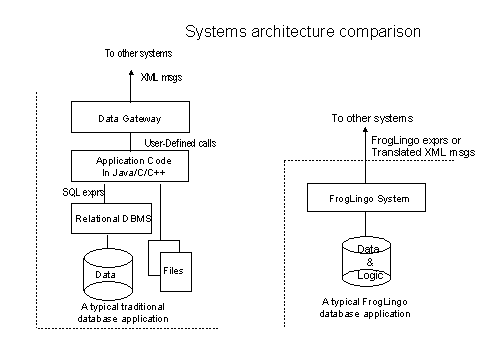
Why do we have to assemble many
computer systems together when we are building up a database application for a
business? We store the business data in a relational database like Oracle®. We
write source code in a programming language like Java®. We write source code in
a communication protocol like XML. And we embed server-side scripts like JSP in
HTML files. All of these pieces are constructed by different languages and
stored separately. Are they logically separated into independent layers? The
answer is not quite what we wished. When the business drives a change to the
database application, all the pieces are subject to be modified.
FrogLingo brings another avenue for
database application development and maintenance. Since the data and
application logic are stored uniformly and they can directly reference each
other, those ¡°pieces¡± are physically and logically collided together with the
FrogLink. FrogLingo uniformly stored data and business logic in a single space.
A FrogLingo system talks with other systems by using FrogLingo. FrogLingo also
allows users to express data in HTML files.
Writing source code for data access control in a traditional
method is another overhead in database application development and maintenance.
Is there a generic mechanism for data security as if it was for the file access
security in operating systems? The way of organizing data in FrogLingo can make
it happen and the FrogLingo system does that.
Querying hierarchical data in
relational databases is the bottleneck in response time. Again the way of
organizing data in FrogLingo can eliminat the bottleneck. It is to be proved
that the future release of the FrogLingo system has its competent system
performance on querying any data.
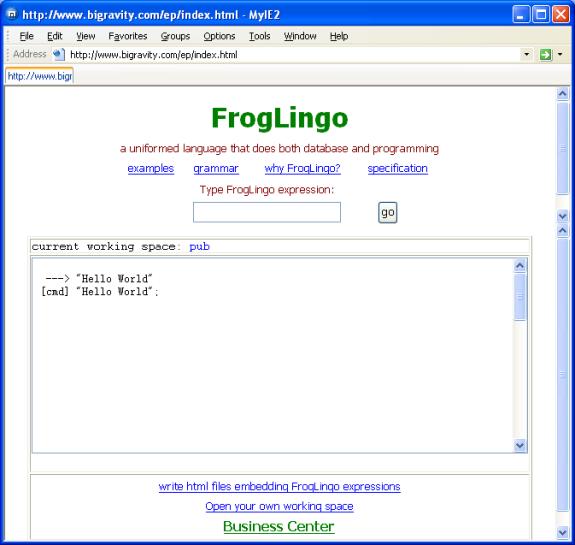
Only thing you need to access the
FrogLing system is to have an Internet browser that is connected to the
Internet.
The website http://www.froglingo.com provides an
on-line tryout system for FrogLingo. When you type a FrogLingo commands that
always ends with ¡°;¡±, the response will pop up below in a window. When you
entered multiple commands, the latest response was displayed at the top of the
window.
The command
print .;
echoes the entire data in the
public space.
The window shows the text ¡°Current
working space: pub¡± which indicates that you
are working in a public space called ¡°pub¡±. Since many people may create or
delete the data in the same public space simultaneously, you may not get the
response as you expect.
To open your own working space, you
may click ¡°open your own working space¡±.
The sections 2, 3, 4, and 5
provide the basic concepts of organizing business data in FrogLingo. Sections
8, 10 and 11 complete the discussion of the FrogLingo that utilizes the theory
of lambda calculus, which guarantees the full power of the FrogLingo to express
arbitrary computable applications.
Section 6 and Section 16 are
dedicated for expressing a sales system in FrogLingo as a database application.
Section 8 introduces the graphical presentation of FrogLingo databases ¨C an
alternative view in helping database organization (design).
Section 12 introduces the methods
of data retrievals. The set-oriented (select-like) operations allow
user-defined functions to be recursively applied in select clauses. This is one
of the most significant features that the traditional language systems and
database management systems don¡¯t have. Section13 enumerates a set of built-in
operators that could derive the relationships among the data stored in the
FrogLingo databases. Some of the operators can express recursive relationships
such as ¡°is there a path between two vertices in a directed graph?¡±.
The rest of sections are the
additions to the FrogLingo features, that are inherited the popular features of
the traditional language systems and database management systems. They are not
essential theoretically, but they are very critical in practice.
Section 17 and 18 are intended to
address data security and data communication and sharing; and to be finished in
coming releases.
Through the entire document, the
FrogLingo expressions in courier
font were tested.
Like other languages, integers,
real numbers, and strings are the basic data types (constants) in
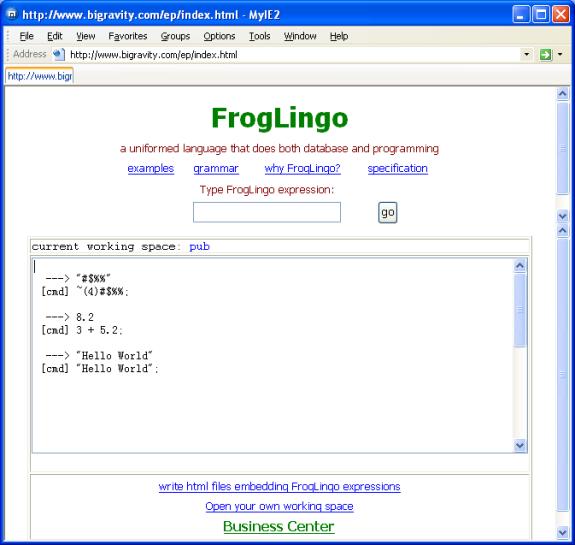
FrogLingo. When we type a constant, FrogLingo just simply display it back.
FrogLingo supports the basic
mathematical operations plus (+), minus (-), multiplication (*), division (/)
and modulus (%) among numbers. For the complete discussion about binary operations,
please see Section ¡°Binary Operations¡±.
To support bingary strings (a
string of bytes with arbitrary byte values), FrogLing used the form: ~(len)bin_string, where len is the length of the binary
string bin_string. An example is
~(5)@#$%^.
FrogLingo
also supports a date format: ¡®mm/dd/yyyy¡¯,
for example, ¡®01/01/2004¡¯. FrogLingo
at this release stores it in its integer form:
1072933200. To display it in a date/time format, one needs explicitly to
specify it. The detailed syntax about how to format the dates will be provided
in a coming release.
An identifier in FrogLingo
is a sequence of ASCII characters including letters, digits, and the underscore
character ¡®_¡¯. The first character must be a letter or ¡®_¡¯. The examples are Salary, John, Word123_, _basic.
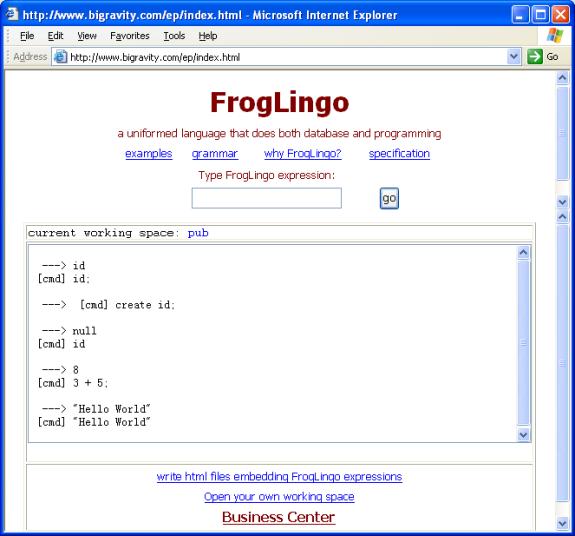
While FrogLingo recognizes
automatically all the constants, an identifier must be declared. One way of
declaring identifiers is to explicitly create it by using the built-in operator
¡°create¡±. See the following
screen for a sequence of commands.
A term in FrogLingo is
either:
- a constant, such as 3.14,
¡°Hello World¡±;
- an identifier, such as John,
salary; or
- a sequence of two terms with a closed pair of
parenthesis. The examples are (John
salary), ((country state) county), (tax (John salary)), (3.14 (salary
¡°Hello World¡±)).
A term that consists of a sequence
of two terms, is called a combinatory term (or simply spelled as ¡°com-term¡±).
The first term of a com-term is called the plus-term (in the
correspondence of a binary operator ¡®{+¡¯,
and the unary operator pterm); and the second term the minus-term. (in
the correspondence of a binary operator ¡®{-¡®, and the unary operator mterm).
If the minus-term of a term is not
a com-term, the parenthesis of the term can be stripped out without ambiguity.
For example, ((country state) county)
is equivalent to country state county.
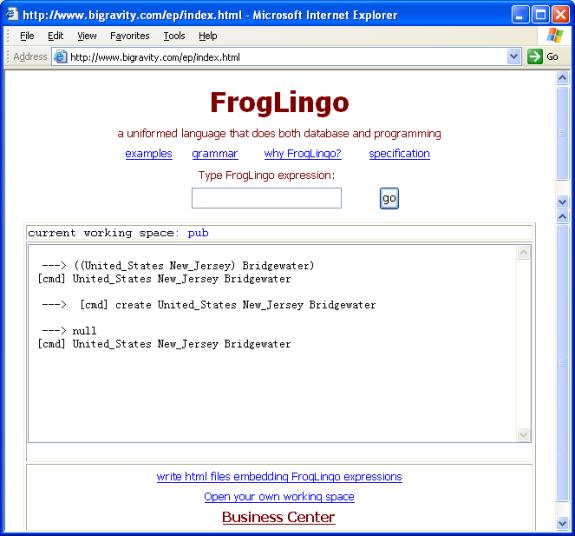
Like an identifier, a com-term must
be created before the FrogLingo database recognizes the term. See the screen
below for a few examples on terms.
Further, if a com-term has a
constant as the plus-term, the FrogLingo database will reject it.
A
term in a com-term is called a inner-most or a left-most if there is no
more term at the left of it. For example, a is a
inner-most term of the term a b c d,
so do (a
b), (a b c), and (a b c d) itself. A term in a com-term is called an outer-most
or a right-most term if there is no more term at the right of it. For example, a b c d has a and a b c d itself as its outer-most terms; and the term (e (f (g h))) has h, g h, f (g h), and
(e (f (g h))) as its outer-most
terms. Any term that appears in a second term is called a sub-term of
the second.
As an application of the infamous
mathematic theory l-calculus and
function space, the term is the most important concept in FrogLingo.
More forms of terms will be
introduced in the rest of the sections.
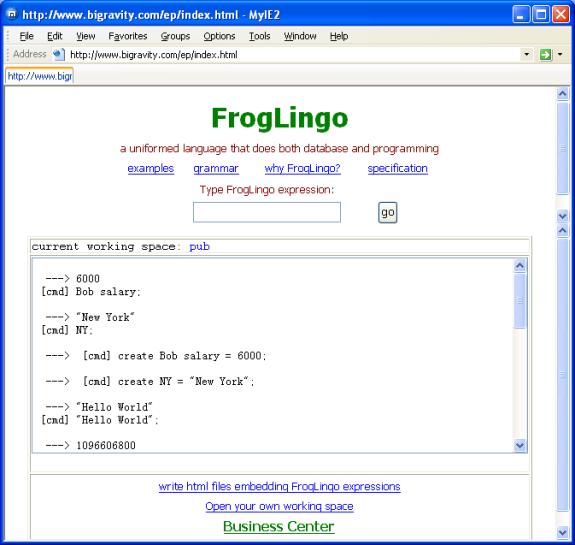
An assignment in FrogLingo
is a state that an identifier or a com-term takes another term as its value. An
assignment must be explicitly constructed in a FrogLingo database by using the
built-in operator create. See
the screen as examples.
The term at the left side of the mark ¡®=¡¯ is assignee;
and the term at the right side the assigner. In the rest of the
document, we normally call the assignee the term and the assigner the value of
the term. In other words, when we say a term that has an assigned value, the
term is the assignee.
The FrogLingo components defined so
far are enough to inventory business data. This section takes a mini on-line
sale system as an example to show how to model business data into FrogLingo
databases.
The following comments construct
the source data for the on-line sale¡¯s system. The data includes the following
information.
- customer information. A customer has the first name (fname), last name (lname), email address, and phone
number. A customer is represented by a number unique (e.g., 1000) among customers.
- Storage information. A product such as apple in the storage has its
volume and its unit price.
- Order information. Each customer could have multiple
orders, and each order could have multiple items (products), and each item
in an order must be specified with a volume. Each order has its status and
its date that the status changes.
- The owner has its own record of the total cash he/she
has.
create customer 1000 fname
= "John";
create customer 1000 lname =
"Smith";
create customer 1000 email
="john.smith@bigravity.com";
create customer 1000 phone =
"908 655-0444";
create customer 1001 fname
= "Dennis";
create customer 1001 lname =
"Alexandra";
create customer 1001 email
="abc@bigravity.com";
create customer 1001 phone =
"908 233-0324";
create storage apple volume
= 500;
create storage apple price =
1.89;
create storage milk volume =
500;
create storage milk price =
2.95;
/*
Order# Item# */
create order (customer 1000)
10000 100000 product = storage apple;
create order (customer 1000)
10000 100000 volume = 12;
create order (customer 1000)
10000 100001 product = storage milk;
create order (customer 1000)
10000 100001 volume = 1;
create order (customer 1000)
10000 status = "pending";
create order (customer 1000)
10001 100003 product = storage apple;
create order (customer 1000)
10001 100003 volume = 14;
create order (customer 1000)
10001 status = "complete";
create order (customer 1000)
10001 date = '01/01/2004';
create order (customer 1001)
10002 100004 product = storage apple;
create order (customer 1001)
10002 100004 volume = 14;
create order (customer 1001)
10002 status = "complete";
create order (customer 1001)
10002 date = '01/01/2004';
create mybank cash = 1000;
The above data can be entered via http://www.bigravity.com/ep. The way of
constructing it via embedded FrogLingo in HTML files is described in another
document ¡°User¡¯s Guide to embedding FrogLingo in HTML files¡±.
In summary, a FrogLingo database is
a finite set of terms. A term in the database is either an identifier or a
com-term. A term in the database is called Distinguished Name (DN). A
term in the database can be explicitly assigned with a value (or precisely a
FrogLingo term). When a term in the database is a com-term, then its plus-term
and minus-term are automatically in the database no matter if they are
explicitly declared by the command create
or not.
It is sufficient to introduce the
entire FrogLingo system by using terms. But here we provide an alternative view
of FrogLingo databases. Hope that it is helpful in database design. But you may
ignore this section if you found more confusion.
When we draw a graph that take each
term in the database as a node, and use a directed link between two nodes according
to their relationships, then we obtain a directed graph. For example, a part of
the data for the on-line sale system in Section 6 has the following
corresponding directed graph.
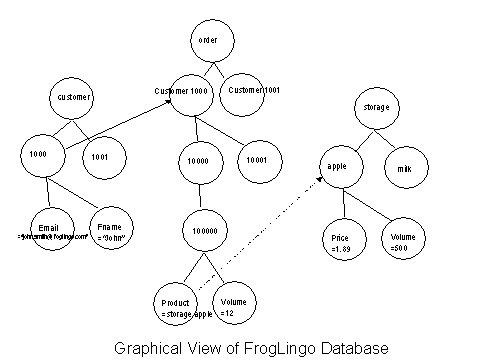
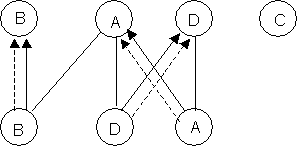
Each node (in corresponding a com-term) has its minus-term
spelled in the circle.
Each solid up-down link represents a plus and com term
relationship; a slide arrow connects a com-term to its minus-term; and a dash
arrow connects an assignee to its assigner. By ignoring two of the three kinds
of the links, the remaining graph is a tree-structure (a finite set of
trees). These relationships are
utilized as binary and unary operators in FrogLingo (see more discussion in the
section ¡°built-in operators¡±).
An arbitrary FrogLingo expression
can be evaluated to its unique value against a FrogLingo database. For example,
Bob salary has its value 6000 as it was explicitly assigne. A
value is called a normal form -- a term that cannot be further
evaluated:
- Constants are in norm forms, e.g., 3.14, ¡°Hellow World¡±.
- An identifier not defined in database has null as its norm form. For
example, ¡°an_id_not_in_DB¡±
has value null.
- If null
is the plus-term of a com-term, then the normal form of the com-term is null. For example, (null 3.14)is null.
- If a term is assigned with a second term, then the
norm form of the first is the norm form of the second.
For example, (mybank cash)
has the normal form 1000 as
it was explicitly constructed in FrogLingo database in Section 6 above.
Another example: if we have the assignments:
create b = a; and
create a =¡±something¡±;
then the normal form of the b
is ¡°something¡±.
- If a term (either an identifier or a com-term) is
defined in db, but no assigned a value, then its norm form is itself.
For example, Bob has itself Bob since it was not assigned as value though
we had the assignment (create Bob
salary = 6000).
- Given a com-term, if a second com-term can be found
in the database; and if the plus-terms of the two terms have the same norm
form; and if the minus-terms of the two terms have the same norm form,
then the norm form of the first com-term is the norm form of the second
com-term. Otherwise, the first com-term has null as its norm form. For
example, let¡¯s have more assignments:
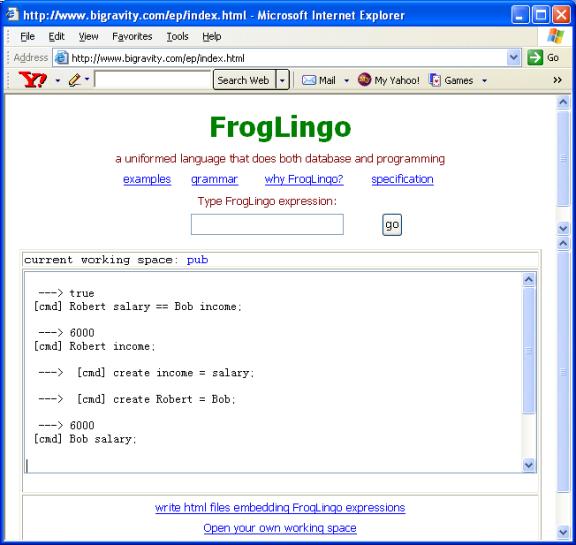
create Bob salary = 6000;
create Robert = Bob;
create salary = income;
Then (Robert income) will
have 6000 as the norm form
too.
When two terms have the same norm
form, then we say that they are equal. The binary operation == against terms
are introduced from here.
All of these examples can be tried
out at http://www.froglingo.com. See
some of them in the following screen.
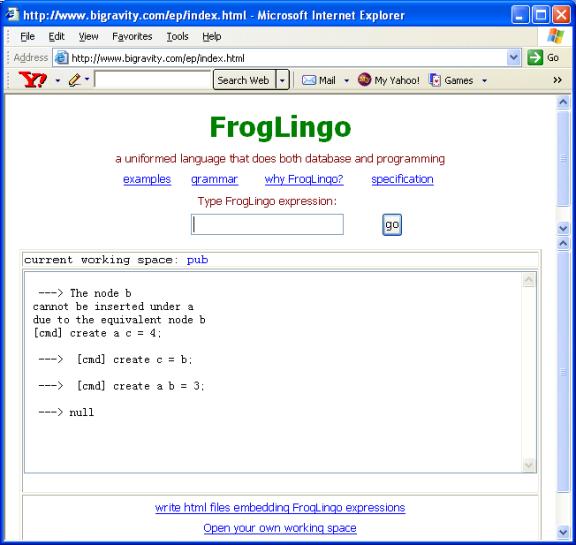
To keep a FrogLingo database in its
integrity, FrogLingo will reject a data construction command if it violate one
of the following two rules::
- Multiple assignments cannot form a loop in database.
For example:
create n1 = n2;
create n2 = n1;
The second command
will fail.
- If two com-terms in database have the
same plus-term, then their minus-terms can not be equal.
FrogLingo also adapts the commonly
used binary form to express binary operations. A binary term or bin-term,
another type of FrogLingo terms, is in the form of
(operant operator operant)
Here an operant is a FrogLingo term and the operator is a binary operator. The
most commonly used operators are the arithmetic ones +, -, *, /, and %; and the
Boolean operators ==, ¡°and¡±, and ¡°or¡±.
In addition, FrogLingo introduces
many new boolean binary operators. For example,
(John salary {+ John)
which says that the plus-term of
the term John salary is John. For the complete binary
operators in FrogLingo, please see the section ¡°Built-in operators¡±.
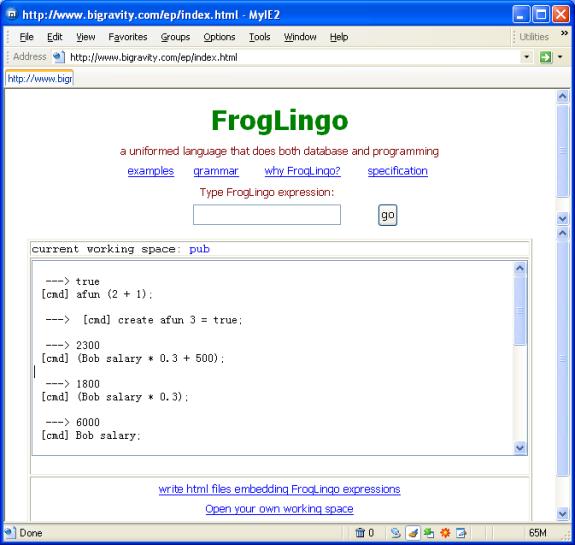
Note that the closed parentheses must be used to surround a
bin-term when it acts as a bin-term among other forms of FrogLingo terms. For a
precise syntactical form of binary operations, please reference the section
¡°FrogLingo grammar¡±.
A variable is an identifier
prefixed with the mark ¡°$¡±. For example, $var
and $anyidentifier.
A variable is a term too in
FrogLingo. In a FrogLingo database, a variable can appear in an assignment.
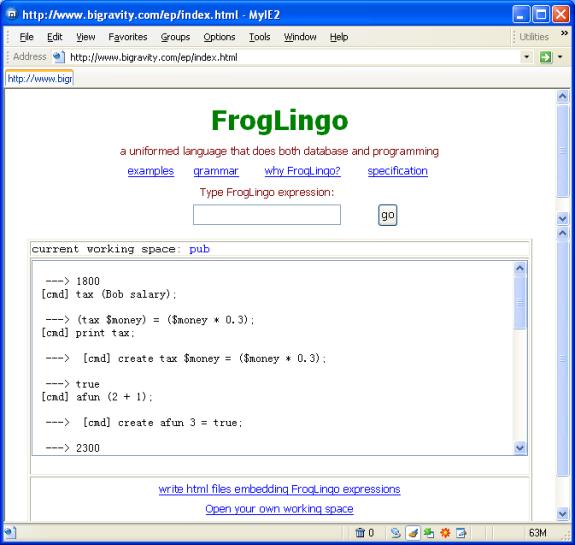
For example, we can define:
create
tax $money = ($money * 0.3);
Here the identifier part money of the variable $money don¡¯t have to be pre-defined in
database. There are two rules when a variable is defined:
- If a variable appears as a part of the assigner
(right side), then it must be claimed as a part of the assignee (left
side).
- A variable is not allowed to be an inner-most term of
a com-term.
When all the variables in an
assignment are replaced by the terms that are meaningful (has a norm forms)
against a database, the norm form of the assignee is the norm form of the
assigner after the replacement. For example:
tax (Bob salary);
Here Bob
salary replaces all the occurrences of the variable $money. Then we have the following
equation:
tax
(Bob salary) == (Bob salary * 0.3)
This further would be evaluated as
tax
(Bob salary) == 1800.
A com-term having variables is in
fact a function taking parameters having ranges of infinite. In the world of
FrogLingo, it is equivalent to infinite number of com-terms. The term tax $money above, for example,
assembles the com-terms: tax 0; tax 1;
tax 2; ¡.
In the example tax $x above, the tax may vary
depending on the salary ranges. Assume the new business rules: if a person¡¯s
salary is less than 20,000, then tax is 0%; when a person¡¯s salary is between
20,001 and 100,000, then the tax is 30%; otherwise, the tax is 50%. Then the
function tax could be redefined
as the following:
create
tax $range1:[$range1 > 0 and $range1 < 20000] = 0;
create
tax $range2:[$range2 >20001 and $range2 < 100000] = ($range2 * 0.3);
create
tax $range3:[$range3 > 100001] = ($range3 * 0.5);
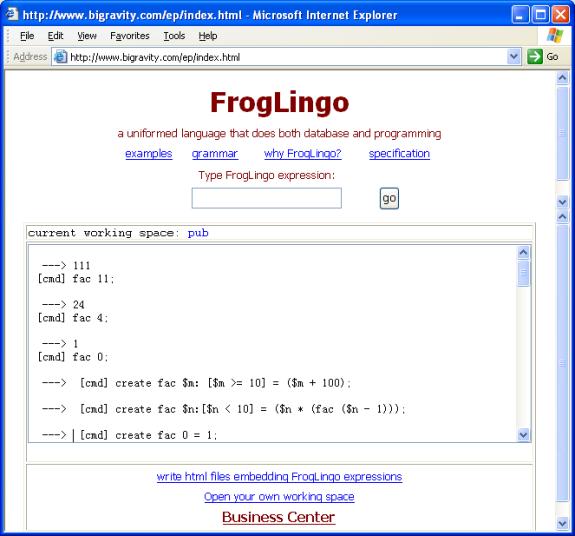
Note that the variables for the
same function must be named differently in FrogLingo.
FrogLingo doesn¡¯t verify if the
variable ranges under a plus-term are overlapped or not. It is programmers¡¯
responsibility to make sure that the ranges defined don¡¯t overlap. Otherwise,
FrogLingo will find the first match of the conditions and execute the commands.
We have already used the
expressions like:
customer
1000 fname;
tax (Bob salary);
The responses ¡°John¡± and 6000 are the individual values (or called normal forms).
The way of pinpointing to individual values is one of the unique features
FrogLingo offers as a database management system. One of its side-effects is
that it allows FrogLingo expressions being easily embedded in HTML files for
dynamic content generation on websites.
Like other relational databases,
FrogLingo also supports set-oriented (sets of values) operations. Given a
database having a data record:
Bob
salary = 6000,
a query example is:
select $person, $person salary where $person salary > 1000;
It will retrieve the names and the
salaries of the people whose salaries are larger than 1000.
Another unique power of FrogLingo
is being able to apply user-defined functions in select operations. Assume that
the tax of a person is 30% of his/her salary:
create tax $money = ($money * 0.3);
Then we will have the select
operation:
select
$person, $person salary, tax ($person salary)
where $person salary > 1000;
It will retrieve the names, the
salaries, and the taxes of the people whose salary are larger than 1000.
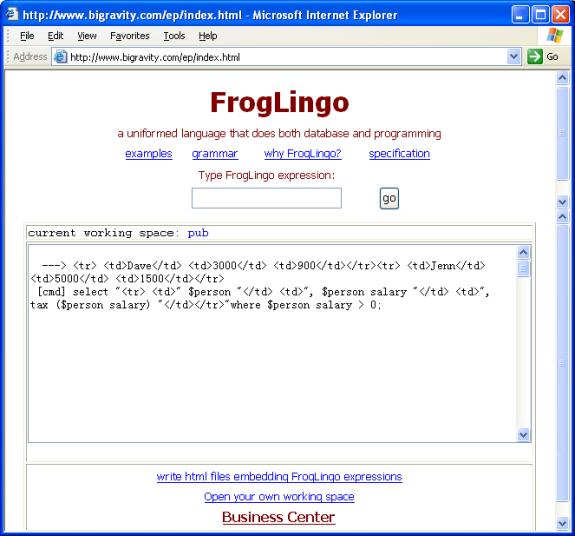
The output of a select operation
can go into a delimited file; or a web page. FrogLingo allows programmers to
define the output layouts by themselves. Here is the format:
select
text1 exp1($var) text2, text3 exp2($var) text4, ¡
where condition ($var);
here exp1($var), exp2($var), ¡ are
the FrogLingo expressions having a variable; and text1, text2, text3, text4, ¡
are strings surrounding the exprssions.
FrogLingo introduces a set of
built-in operators. The most significant ones stem from the relationships
between com-terms and their norm forms, plus-terms, and minus-terms. They will
be heavily used in set-oriented (or select-like) operations that will be
discussed later.
Along with the sample FrogLingo
database for the on-line sale system given in ¡°Organizing your business data in
FrogLingo¡±, these relationships are summarized in the following sub-sections.
Note that the operators discussed
in this section are only applicable to the terms not having variables. When a
term has variables, the operators ignore them, give an error message or give null as the response.
When we type the command:
customer 1000 fname;
FrogLingo will respond with
¡°John¡±
This is the result of FrogLingo evaluation rules against the
database described in Section ¡°Organizing Business Data in FrogLingo¡±; and it
is the intension at some circumstances during business logic process. But
sometimes we may don¡¯t want the evaluation taken place. To stop the FrogLingo
evaluation rules, we introduce the unary operator canon (meant the canonical form of a term). So the
expression
canon
(customer 1000 fname)
will have the response:
customer
1000 fname.
Given a term customer 1000 fname, we say that the
term customer 1000 is the
com-term of customer 1000 fname;
and customer is the com-term of customer 1000. Similarly, fname is the minus-term of customer 1000 fname; and 1000 is the minus-term of customer 1000. These relationships
embed tree-structures in databases.
All the operators by default take
the canonical form of their operants. In other words, the operants are not
evaluated by the rules in Section 8. For example when we have
customer 1000 fname {+ customer 1000;
FrogLingo does not reduce the
term customer 1000 fname to its
value ¡°John¡±, but automatically
meant
canon (customer 1000 fname) {+ canon (cutomer 1000);
Definition:
When a term term1 is the plus-term of a com-term term2, the following binary operation
holds true:
term2
{+ term1, or
term1
}+ term2.
Examples:
customer
1000 {+ customer;
customer
1001 {+ customer;
customer
1000 fname {+ customer 1000;
Sample business needs:
- Find all the customes. The select-like operation in
Froglingo is:
select $cust where $custId {+
customer.
The output will include customer
1000 and customer 1001.
- Retrieve all pairs of the attribute names and their
value about the customer (Customer
1000). The select-like operation in FrogLingo is:
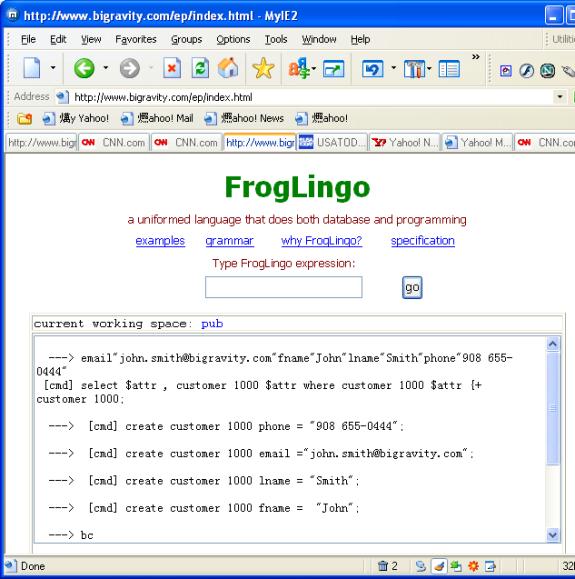
select $attr, customer 1000 $attr
where customer 1000 $attr {+ customer 1000;
The screen below printed out the result. Though it
was not nicely laid out, it did show the email, fname, lname, and phone. For
how to format the output of the select-like operations, please read the coming
section ¡°set-oriented operations¡±.
Definition:
When a term term1 is the inner-most plus-term of a
com-term term2, the following
binary operation holds true:
term2
{=+ term1, or
term1
}=+ term2.
Note that an inner-most term of a
term could be the term itself; the plus-term; and a nested plus term.
Examples:
customer 1000 {=+ customer;
customer
1000 {=+ customer;
customer
1000 fname {=+ customer;
customer
1000 fname {=+ customer 1000;
customer
1000 }=+ customer 1000 fname;
Sample business needs:
Retrieve all the terms under the
node customer.
select canon $node, $node
where $node {=+ customer;
These unary operators provide a
means to navigate in FrogLingo database from one term to another.
When the definitions are given, the
following terms are assumed in the database:
t
t1;
t t2;
¡;
t
tn;
The graph presentation is given
below.
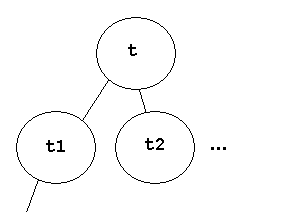
13.2.3.1
pterm
The expression form:
pterm t
returns the plus-term of the term t. When the term is an identifier or a
constant (therefore it has no plus-term), pterm
t would return null.
Example:
pterm
(customer 1000) == customer;
pterm
customer = null;
13.2.3.2
pfirst
The operator pfirst is for the reversed navigation
of pterm. The expression
pfirst
t;
will return term t1, the first term among {t1, t2, ¡}. If there is no term under the given term t, pfirst
t will return null. For
example:
pfirst
(customer) == customer 1000;
pfirst
(customer 1000) = customer 1000 email;
pfrist
(customer 1000 email) = null;
Here the t1 is called the first among {t1, t2, ¡} because t1
is the smallest among them in terms of alphanumeric orders. Note {t1, t2, ¡} are physically stored
under the term t in their
alphanumeric orders.
13.2.3.3
pnext
The expression:
pnext
(t t1)
will return t t2; and pnext
(t t2) will return t t3.
When tn is the last among {t1, t2, ¡}, then pnext (t tn) will return null. For example:
pnext (customer 1000 email) == customer 1000 fname;
pnext
(customer 1000 phone) == null;
13.2.3.4
pprev
In contrast to pnext, the expression:
pprev (t t1);
will return null; pprev (t
t2) will return t t1. For
example:
pprev (customer 1000 email) == null;
pprev
(customer 1000 phone) == customer 1000 lname;
Definition:
When a term term1 is the minus-term of a com-term term2, the following binary operations
hold true:
term2
{- term1, or
term1
}- term2.
Examples:
customer
1000 fname {- fname;
order
(customer 1000) {- customer 1000;
To better illustrate the minus-com
relation, assume that the following data is in the database:
Bob salary = 6000;
Bob phone = ¡°908 333
2222¡±;
Connie phone =
¡°908 555 2222¡±;
John salary = 5000;
John phone = ¡°333
444 3333¡±;
Then
Bob
salary {- salary;
Sample business needs:
- Find
all the usages of the term salary in
the database. In other words, find all the terms, and the corresponding
values that have salary as
the minus-terms:
select canon $term, $term
where $term {- salary;
Then the terms Bob
salary, 6000 and John salary,
5000 will be retrieved.
FrogLingo was originally called EP (Enterprise-Participant)
database language. It was believed that all the business data can be organized
as multiple ¡°enterprises¡± (such as a physical object, an ideal, a plan, a human
being); and each enterprise is formed by multiple participants. In turn, a
participant itself is an enterprise. For example, a school as an enterprise is formed by the students
while each student as en enterprise is registered in the Social Security
Department with his/her attributes (such as name, birth date). Further, a
student participates class activities in the school. A sample FrogLingo
database for the school administration database would looks like:
SSD Mike name = ¡°Mike Lee¡±;
SSD Mike birthdate = ¡®03/03/1980¡¯;
School admin (SSD Mike) studentId = 12345;
School admin (SSD Mike) EnrollDate = ¡®09/01/2000¡¯;
School classCS501 (School admin (SSD Mike)) grade =
¡°A¡±;
The query of ¡°find all the classes
and the corresponding grades that Mike took¡± will be expressed as:
select mterm (pterm
$student)), $student grade
where $student {-
School admin (SSD Mike);
The term School classCS501 (School admin (SSD Mike))
will match the condition. The term pterm
(School classCS501 (School admin (SSD Mike))) will return School classCS501. And mterm (school classCS501) will return
classCS501. Obviously School classCS501 (School admin (SSD Mike))
grade == ¡°A¡±.
Definition:
When a term term1
is the outer-most minus-term of a com-term term2,
the following binary operation holds true:
term2 {=- term1,
or
term1 }=- term2.
Note that an outer-most term of a term could be the term
itself; the minus-term; and a nested minus-term.
Examples:
customer 1000 {=-
customer 1000;
customer 1000 {=-
1000;
customer 1000 fname
{=- fname;
In the school administration database discussed in the above
Section 13.2.4, the following Boolean expressions hold:
SSD Mike {=- Mike;
School admin (SSD
Mike) {=- Mike;
School classCS501
(School admin (SSD Mike)) {=- Mike;
Sample business needs:
Print out all the participations of Mike that are recorded
in the database:
select $action
where $action {=-
Mike;
It will print out all the terms that have Mike as the
outer-most term:
Mike,
SSD Mike,
School admin (SSD
Mike),
School classCS501
(School admin (SSD Mike))
These unary operators provide another set of means to
navigate in FrogLingo database from one term to another.
When the definitions are given, the
following terms are assumed in the database:
T1 t;
T2 t;
¡;
tn t;
The graph presentation is given
below.
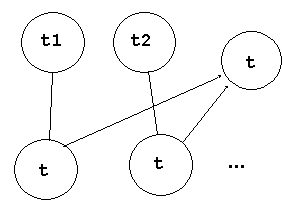
13.2.6.1
mterm
The expression form:
mterm term
returns the minus-term of the term term. In other words:
mterm
(t1 t) == t;
mterm
(t2 t) == t;
When term
is an identifier or a constant, mterm
(term) returns null. For
examples:
mterm
(customer 1000) == 1000;
mterm
customer = null;
13.2.6.2
mfirst
The expression
mfirst t;
will return term t1
t, the first term among {t1, t2,
¡}, where t1 t; t2 t, ¡ are in the database; and t1, t2, .. are in alphabetic order. If a term term hasn¡¯t being participated in
another enterprise (in other words, a term hasn¡¯t been used as a minus-term of
another term), mfirst term will
return null. For examples:
mfirst salary
== Bob salary;
mfirst (customer
1000) == order (customer 1000);
mfirst Mike == SSD
Mike;
mfirst (SSD Mike) ==
school admin (SSD Mike);
mfirst (Bob salary)
== null;
13.2.6.3
mnext
The expression:
mnext
(t1 t)
will return t2 t, the
next term of (t1 t) among the
set {t1 t, t2 t, ¡} that are in
the database, and t1, t2, ¡ are
in alphabetic order. When t2 t
is the last among {t1 t, t2 t, ¡},
then mnext (t2 t) will return null.
For example:
mnext (Bob
salary) == John salary;
pnext (John salary)
== null;
13.2.6.4
mprev
In contrast to mnext,
the expression:
mprev (t1 t);
will return null;
mprev (t2 t) will return t1 t. For example:
mprev (Bob
salary) == null;
mprev (John salary)
== Bob salary;
In the previous section 13.2, we discussed relationships
among terms regardless of their values. In other words, we only discussed the
canonical form of the terms constructed in FrogLingo databases. This section
discusses the relationships among terms and their values when FrogLingo
evaluation rules are applied.
Only two types of relationships (<+, >+, and <=+ and >=+) are discussed. There are more relationships such as <- and >=- which are not discussed here. It is believed that
more advanced business applications may find their usages in the future.
Definition:
When a term value
is the value of a com-term (term1
term2), the following binary operation holds true:
value <+ term1,
or
term1 >+ value.
Examples:
6000 <+ Bob;
¡°John¡± <+
customer 1000;
Note that if two terms are related by {+, then they must be related by <+. For example:
customer 1000
{+ customer, then
customer 1000 <+
customer.
Definition:
When a term term1
is the inner-most plus-term of a com-term term;
and the term has the value value,
the the following binary operation holds true:
value <=+ term1, or
term1 >=+ value.
Note that an inner-most term of a term could be the term
itself; the plus-term; or a nested plus-term.
Examples:
¡°John¡± <=+
customer;
storage apple <=
order;
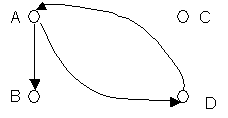
Another usage of the relation <=+ is to find if two
vertices in a directed graph has a path: Give a directed graph having A, B, C,
D; and the arrows A-B, A-D, and D-A, the FrogLingo database is
create C;
create A B = B;
create A D = D;
create D A = A;
Then the following expressions are held true:
A <=+ D;
D <=+ A;
B <=+ D;
A Directed Graph
The FrogLingo presentantion of the Graph
Allowing a sequence of terms as a value is the way to
express multiple actions that are triggered by a single event. For example,
when a purchase order is to be closed, multiple operations have to be executed:
reduce storage volume, generate shipping report, verify credit card, and
deposit money. The complete FrogLingo code for a purchase order closing is
given in the section ¡°Expressing Business Logic in FrogLingo¡±.
create account1 =
100;
create account2 =
300;
create
transfer $money =
(update account2 = (account2 - $money)),
(update
account1 = (account1 + $money)),
;
To check errors in account transfer, the function ¡°transfer¡± is re-written as the
following:
create
transfer_1 true $money =
(update account2 = (account2 - $money)),
(update account1 = (account1 + $money)),
¡°Transaction is complete¡±
;
create
transfer_1 false $money = ¡°The
requested balance ¡°,
$money,
¡° exceeds the balance in account1. Transaction failed¡±
;
create
transfer $money =
transfer_1 (account2 >= $money) $money
;
A term having a sequence of terms can again be a part of
another term. In this case, the first term returns the value of the last term
in the sequence when the second term is evaluated.
We have been using the operator create through out the entire document. The create
operation is the way of constructing databases. Like other database systems,
FrogLingo also has delete and update operations that keep the
FrogLingo database evolving.
To keep a FrogLingo database in its integrity, FrogLingo
will reject a data construction commands if it violate one of the following two
rules::
- Multiple
assignments cannot form a loop in database. For example:
create n1 = n2;
create n2 = n1;
The second command will fail.
- If
two com-terms in database have the same plus-term, then their minus-terms
can not be equal.
With the expression
create term1 =
term2;
the term term1itself (not evaluated) will be stored. Its value is term2, again not evaluated.
When a sub-term in term2
was not defined before, it is expected that the sub-term has to be claimed
later by explicitly using create operation. Therefore a term can be created
even without its assignment such as
create t;
The expression
delete t;
will delete the term t
itself, and all the terms that has t
as a sub-term of the terms or of the values of the terms. For example:
delete Bob;
will delete the terms Bob,
Bob salary.
delete salary;
will delete salary,Bob salary.
delete order;
will remove all the terms under the term order.
Note that a term having variables is not allowed to be
deleted in the Rlease 0.1 of the FrogLingo system.
The expression
update term1 = term2;
will assign term2
to term1 that overwrites the
existing value of term1. The
examples are:
update storage
apple volume = 200;
update Bob
salary = ((Bob salary) * 1.3);
Again like create
and delete operations, term1 at the left side is not
evaluated when the update operation is in process.
As another example, this section provides the code in
FrogLingo that illustrates the process of closing a purchase order. The
database constructed in Section 7 is used.
create close_order $custId
$ordId $cash =
close_order_1 (order (customer
$custId) $ordId status
==
"pending") $custId $ordId $cash;
The function close_order
takes a customer identifier (representing a customer such as 1000), an order id
(such as 10000), and the cash value that is expected to be equal to the total
cost for the order 10000. The function further calls the function close_order_1.
create close_order_1 true
$custId $ordId $cash = close_order_2 (order_cash_total
(order (customer $custId) $ordId))
$custId $ordId $cash;
create close_order_1 false
$custId $ordId $cash =
"The order ¡°,
$ordId,
" of the customer ",
customer $custId fname,
¡°
are not in pending status. Closing the order is not allowed¡±
;
The function close_order_1 takes a boolean value, a
customer id, a order id, and the cash value. If the boolean value is false,
then it return error message. Otherwise, proceed by calling function close_order_2.
create close_order_2 $bill
$custId $ordId $cash =
close_order_3 ($bill == $cash) $bill
$custId $ordId $cash;
The function close_order_2
takes the cash value $bill that
is calculated by the function order_cash_total;
and further inherits $custId, $ordId,
and $cash.
create close_order_3 true
$bill $custId $ordId $cash =
select
update_storage
(order
(customer $custId) $ordId $itemId product)
(order
(customer $custId) $ordId $itemId volume)
where
order
(customer $custId) $ordId $itemId volume != 0
and
order (customer $custId) $ordId $itemId volume != null)
,
(update mybank cash = (mybank cash +
$cash)),
(update order (customer $custId)
$ordId status = "complete")
;
create close_order_3 false
$bill $custId $ordId $cash =
"The charged is ", $bill,
" but the cash you provided is
", $cash,
". Please try again."
;
When close_order_3
takes a false value that is
calculated from the expression ($bill
== $cash), the function returns an error message indicating that the
cash value provided by the customer is not equal to the cost of the order.
Otherwise, it does three things: 1. call update_storage
in a selection operation that subtracts the ordering volume of each product
from the storage. 2. update the bank account balance (mybank); and 3. change the order status from ¡°pending¡± to ¡°complete¡±.
create order_cash_total_2
false $child =
(
($child volume * $child product price)
+
order_cash_total_1 (pnext $child)
)
;
create order_cash_total_2
true $child = 0;
create order_cash_total_1
$child = order_cash_total_2 ($child == null) $child;
create order_cash_total
$ordId = order_cash_total_1 (pfirst $ordId) ;
create update_storage
$product $vol=
(update
$product
volume = ($product volume - $vol)
)
;
The rests are the definitions of update_storage and order_cash_tatol.
To update the volumes of the products in the storage due to the order, a select
expression is used to extract a set (of items). To calculate the total cost due
to the multiple items in the order, we gave an alternative way of enumerating a
set (of the items) ¨C navigating the terms by using the unary operators pfirst and pnext. So whenever we try to extract a specific set of
terms, we can always try to use select expressions first. But if it is not
convenient or difficult, then we will always be able to get it done by walking
through terms along their relationships (such as pfirst,
pnext, pprev, mfirst, mnext, and
mprev)
The FrogLingo has its mechanism for user administration,
data access control, and session control. Data access control in FrogLingo can
be specified as if the file access control in Operating systems was specified.
That allows programmers to leave the data security issues alone and to
concentrate on business applications during software development.
The specification is to be provided at the next release of
this document.
To be provided at the next release.
Many of the features supported by the FrogLingo system are
not specified in this document. A
few features specified in the document are expected in the future, but may not
reflect the real behavior of the FrogLingo system in this release.
Please send emails to admin@bigravity.com for any question or
any software bug you found in the system. Thank you.
.